Short answer: When you leave a scenario, your weapons, armor, materials, medicine and Deviations go to Eternaland, and Energy Links turn into Astral Sand. In the new scenario, open your Backpack, click Inherit Res., pick the items and confirm; each item costs Supply Points from a 20,000-point budget. Blueprints, cosmetics, formulas, design layouts and most currencies follow your account for free. Gear you bring in counts as lost gear (no repair, reverse engineering or trading), and anything you build in Eternaland stays there. To pass items to another character, use the Account Depot in any Eternaland storage box.
On this page
What transfers and what is lost
This is what happens when you leave a scenario for a new one. If you stay and your server merges into the permanent server, you keep everything.
| what | what happens | cost to bring back |
|---|---|---|
| weapons, armor | to Eternaland | Supply Points; arrives as lost gear: can’t be repaired, reverse-engineered or traded |
| materials, medicine | to Eternaland | Supply Points |
| Deviations | to Eternaland | Supply Points |
| calibration blueprints | to Eternaland | Supply Points |
| Planters, Biomechanicals | to Eternaland as items (each uses 1,000 material capacity) | Supply Points |
| Energy Links | converted to Astral Sand | — |
| blueprints, formulas, design layouts, cosmetics, most currencies, some character data, task progress, event items | stay on your account | free |
| character level, scenario progress | start over on the new server | — |
| Lunar Oracle and Starfall Inversion Mutagens | stay in Deviation: Survive, Capture, Preserve | — |
| RaidZone blueprints, weapon accessories, most RaidZone Deviations | stay in RaidZone | — |
| anything built or crafted in Eternaland | stays in Eternaland (harvested crops and animal products are the exception) | — |
src: Console Launch FAQ Q26 (2026-08-24) · WHAT IS ETERNALAND? (2025-06-05) · patch notes 2.3.6 (2026-04-08) · Follow-up Tech Revamp Adjustments (2026-04-15) · patch notes 2.2.0 (2025-10-29) · RaidZone launch preview (2025-07-28) · 2.0 bug fixes (2025-07-09)
The lost gear rule arrived with the 2.3.6 update (April 8, 2026). The All-Purpose Hand can’t repair lost gear inside a scenario either, so worn weapons are a poor use of points. In his Isles of Abyss prep video, Heartcarver brings a chainsaw, an electric drill, a few advanced recycling tools and his combat and territory Deviations, and leaves high-tier weapons behind.
Step 1: move your items out of the old scenario
- During the settlement (rest) phase, open your backpack and move what you want to keep from your scenario backpack and territory storage into your Eternaland Backpack (called the Spacetime Backpack before January 21, 2026).
- When you leave or the scenario ends, everything left moves automatically. When you switch to another season server, it waits in Transit Storage, next to your backpack. Transit Storage shows a countdown and a cap per category (Weapon 0/500 on Heartcarver’s screen).
- Click Withdraw All (F on PC) to move it into your Eternaland Backpack. Sell All (G) is in the same bar.
- If space runs short, sell spares in Eternaland first: Island Shop → Sell. Heartcarver warns that a full backpack is how players lose items here.
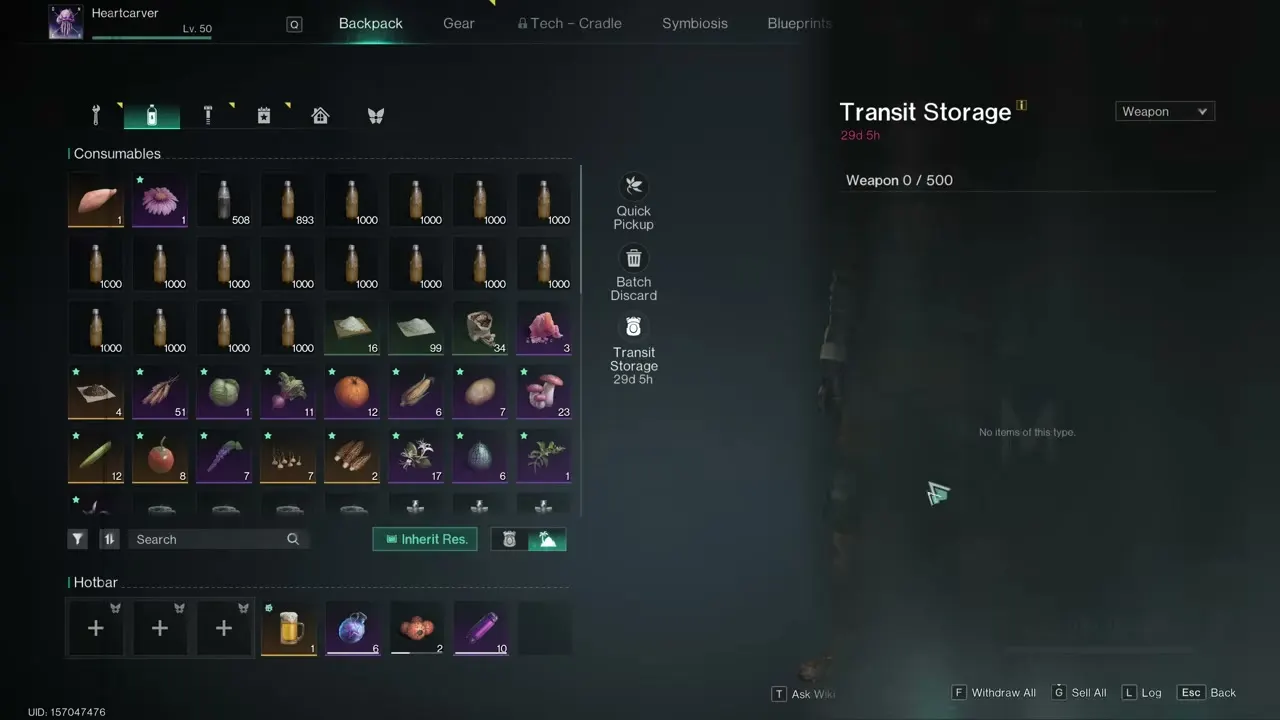 Screenshot: Heartcarver, “Don’t Ignore Eternaland!” on YouTube, at 3:05
How Eternaland works and where the shop is: Eternaland guide.
Step 2: bring items into the new scenario
- Join the new scenario. The sign-up schedule and how seasons end are on Once Human scenarios explained.
- Open your Backpack and click Inherit Res. (next to the search bar).
- In the Inherit Resources tab, browse by category (tools, consumables, gear, territory items, Deviations, weapons and more) or use the search box.
- Select an item. Its Supply Points cost shows on the right, under the target server name (“Send to scenario server …”) and your remaining points.
- Click Confirm. Quick Inherit fills a selection for you. The second tab, Retrieve Supplies, is in the same window.
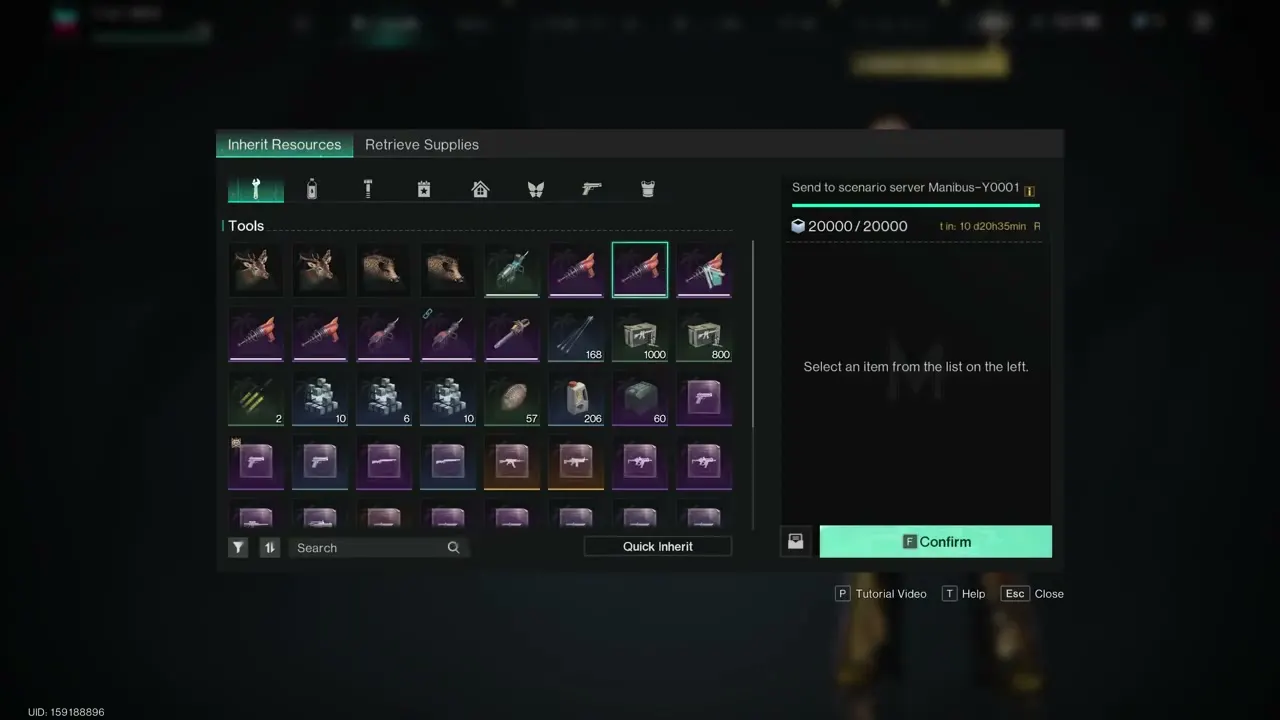 Screenshot: Heartcarver, “What to ACTUALLY Bring to Isles of the Abyss” on YouTube, at 3:06
You don’t have to spend the whole budget at once. For Isles of Abyss, where you start at max level and unlock gear through Tech, see Isles of Abyss servers for what to bring.
Moving items between your characters: the Account Depot
Every storage box in Eternaland also opens the Account Depot, which all characters on the account share. Heartcarver adds that it works within one region.
- In Eternaland, place a foundation and any storage box (a Small Storage Crate works).
- Walk up to it and choose Account Depot (G on PC) instead of Access Items.
- Move the item from your Eternaland Backpack into the depot.
- Log in on the other character, go to their Eternaland, open any storage box’s Account Depot and take the item.
- Back in that character’s scenario, pull it in with Inherit Res. as in step 2.
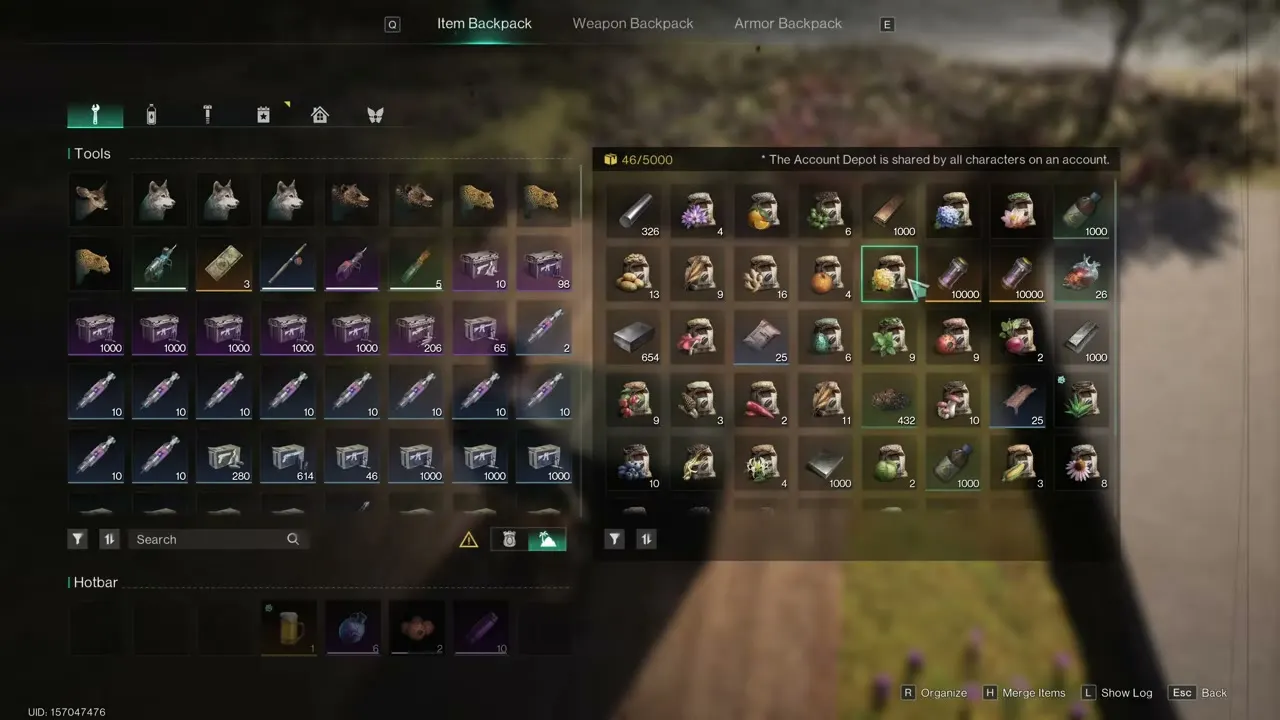 Screenshot: Heartcarver, “Don’t Ignore Eternaland!” on YouTube, at 7:00
Limits
| limit | value |
|---|---|
| Supply Points budget | 20,000 (shown as 20000/20000 in the Inherit Resources window) |
| permanent servers | points reset to 20,000 at 00:00 server time on the 1st of every month (since Dec 10, 2025) |
| extra points | buy with Astral Sand in the Eternaland Shop; quota refreshes every 7 days from your server’s launch; rate depends on the scenario |
| new characters | get Supply Points when they enter a non-novice scenario (since Aug 13, 2025) |
| cost per item | different for every item; shown when you select it |
| Account Depot | 5,000 slots (46/5000 on Heartcarver’s screen) |
| Transit Storage | cap per category (Weapon 500) and a countdown |
| RaidZone | no Eternaland access during a match; no Eternaland supplies in, no RaidZone items out |
src: Dev Blog (2025-12-08) · patch notes 2.3.2 (2026-02-04), 2.1.1 (2025-08-13) · Console Launch FAQ Q26 (2026-08-24) · RaidZone launch preview (2025-07-28) · Heartcarver TXO2KfhKwro @03:06, aLbKHE_tU8g @03:05, @07:00
Known bug (October 2026): Bay Crocodile patterns are lost when you transfer a crocodile out of Eternaland. The October 23 fix notes said the fix would come with the November update, but it is not listed in the 3.1.2 notes (November 4) or the fix lists of November 5 and 6. Until a fix is listed, keep a patterned crocodile in Eternaland if you want to keep its pattern.
Closed servers: when a server closes, characters and resources still on it go to Eternaland automatically. This is what happened to the Evolution’s Call and Prismverse’s Clash permanent servers on January 7, 2026.
Existing characters moving to Isles of Abyss: the official server schedule says moving an existing character resets its level and supplies, while account data such as cosmetics, Blueprint Level and Mod Level stays.
FAQ
How much does it cost to transfer items out of Eternaland?
How do I transfer Deviations to Eternaland?
How do I transfer materials and resources to Eternaland?
Can I sell Deviations in Eternaland?
Can I move items between my characters?
Do I lose my base when the season ends?
What changed
- v3.1.2 · 2026-11-063.1.2: crocodile pattern bug rechecked; the promised fix is not in the 3.1.2 notes or the Nov 5–6 fix lists.
- v3.1.1 · 2026-10-30Page created.
Sources
- Starry Studio (oncehuman.game), Version 3.1.2 Update Announcement (November 4)
- Starry Studio (oncehuman.game), 3.1.2 Bug Fixes (November 5)
- Starry Studio (oncehuman.game), 3.1.2 Bug Fixes (November 6)
- Starry Studio (Steam), Once Human Console Launch FAQ (24 Aug 2026), Q25–Q26: what moves to Eternaland and what you keep
- Starry Studio (oncehuman.game), WHAT IS ETERNALAND? (official guide, 5 Jun 2025): Settlement Phase transfers, Supply Points
- Starry Studio (oncehuman.game), Dev Blog | Pre-Selection and Other Permanent Server Optimizations Coming Soon (8 Dec 2025): 20,000 Supply Points monthly reset
- Starry Studio (Steam), Version 2.3.6 Update Announcement (8 Apr 2026): gear from Eternaland marked lost gear
- Starry Studio (Steam), Follow-up Tech Revamp Adjustments (15 Apr 2026): Planters and Biomechanicals transfer as items
- Starry Studio (Steam), Version 2.3.2 Update Announcement (4 Feb 2026): buying extra Supply Points with Astral Sand
- Starry Studio (Steam), Version 2.3.1 Update Announcement (21 Jan 2026): Spacetime Backpack renamed Eternaland Backpack
- Starry Studio (Steam), Version 2.1.1 Update Announcement (13 Aug 2025): Supply Points for new characters
- Starry Studio (Steam), Version 2.2.0 Update Announcement (29 Oct 2025): Deviation: Survive, Capture, Preserve Mutagens stay in the scenario
- Starry Studio (Steam), Dev Update | Once Human: RaidZone Official Launch Preview (28 Jul 2025): RaidZone transfer rules
- Starry Studio (Steam), Version 2.0 Bug Fixes (9 Jul 2025): what can be carried out of Eternaland
- Starry Studio (Steam), 3.1.1 Bug Fixes (23 Oct 2026): crocodile patterns lost when transferring out of Eternaland
- Starry Studio (Steam), Server Opening Schedule for Isles of Abyss and Isles of Abyss: RaidZone (21 Oct 2026): what resets when you move an existing character
- Heartcarver (YouTube), Don't Ignore Eternaland! (Once Human Item Transfer & Storage Guide)
- Heartcarver (YouTube), What to ACTUALLY Bring to Isles of the Abyss (Once Human Expansion Prep)
Once Human Guide is a fan site. Not affiliated with Starry Studio / NetEase. Once Human and related names are trademarks of their owners.