Short answer: Pick the job first, then the hull. For combat, build a small flat deck with cannons and electric propulsion and keep Load low. For farming, add Trawl Nets, a Tidal Cage and workbenches, which don’t add Load. Armor only the outer hull and bow with iron or steel. When you like the ship, save it as a design (a “Design Layout”) so you can summon it again and share it with your squad.
On this page
- Before you copy a design
- The five designs at a glance
- 1. Iron starter boat template
- 2. Light cannon platform
- 3. Workshop trawler (cargo and fishing ship)
- 4. Squad gunline hull
- 5. Warship
- Ship design gallery: transport, warship, houseboat, work boat
- Save, reuse and share your design (ship blueprints)
- Design rules that apply to every ship
- FAQ
- What changed
Before you copy a design
Every design below starts the same way: a core deck, a helm, propulsion and an anchor. If you haven’t built your first ship yet, follow How to build a ship first, then come back and reshape it.
Three numbers on the left of the Build Mode screen decide whether a design works:
- Handling: how easily it turns. Side thrusters add it.
- Speed: the top speed your propulsion allows. Sails, propellers and boosters add it. Before you place a part, its tooltip shows what the total will be.
- Load: the ship’s weight. Only structural pieces add Load; facilities and decorations don’t. Heavier materials (iron, steel, alloy) add more Load than wood.
The top of the screen also counts structures, facilities and storage against your limits. Those limits rise with Ship Upgrade unlocks in the Archipelago section of the Tech tree.
The five designs at a glance
| design | best for | hull | propulsion | key parts | Load |
|---|---|---|---|---|---|
| Iron starter template | first real ship, solo | iron hull, deck and bulwarks | 3 Electric Propellers | wheelhouse, solar generators, Trawl Net | — |
| Light cannon platform | ship combat, Calamity Towers | flat deck, armor only where hit | thrusters, advanced electric propellers, boosters | 3 cannons, supply bench | as low as you can |
| Workshop trawler | farming, long trips | wood inside, iron outside | electric propellers + one large sail, side thrusters | Trawl Nets, Tidal Cage, 4 workbenches, generators | structure only; facilities add none |
| Squad gunline hull | 2–4 players | low, flat, straight sides | engines | cannons in one line, rams at the bow | — |
| Warship | looks and armor | iron, stacked triangular bow, tall bridge | — | angled armor, cement texture | tall iron hull |
src: therealjesstron SK5z1TQyUx8 · MaleOreo eHuqSVMlzvg @03:20–05:30 · Grizl o5-Cq9fuLF0 @07:00 · SysFem64 WNM-tSNh52w @03:50–07:10 · DibXP S7PAm3YAiLs
1. Iron starter boat template
A rectangular iron boat with a pointed bow and a raised wheelhouse near the stern. It’s a good first upgrade from the tutorial hull: simple to copy piece by piece, and roomy enough for facilities.
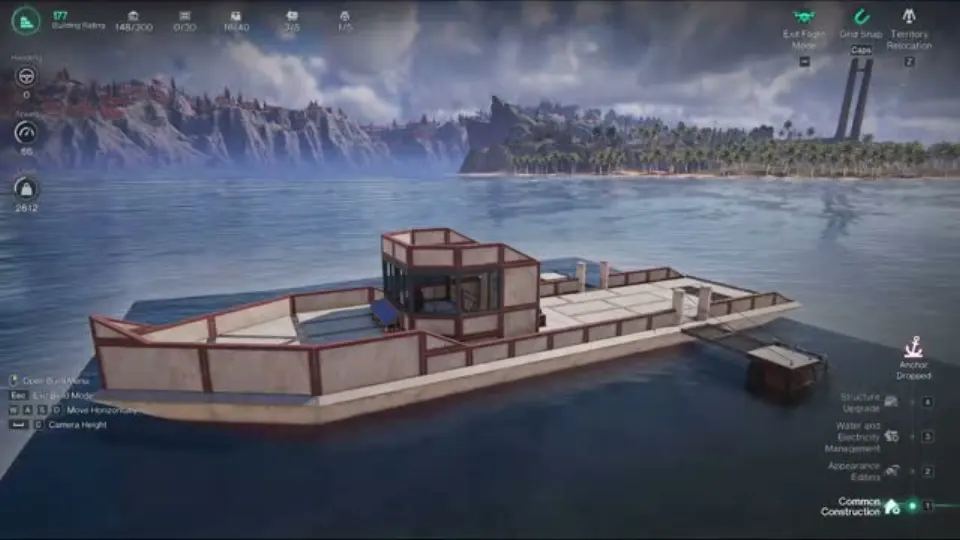 Screenshot: therealjesstron, “Once Human Isles of Abyss Boat Template| Can be F2P/Paid Build!” on YouTube, at 4:08
What the video builds, in order:
- Hull: 1/4 iron hulls and iron decks laid as a long rectangle, with a triangle of deck pieces for the bow.
- Walls: iron bulwarks all round, with Iron Triangular Bulwarks closing the bow. The handrail menu offers wood, iron, steel and alloy versions.
- Wheelhouse: a small two-level box of iron bulwarks with windows, the Ship’s Wheel inside.
- Propulsion: three Electric Propellers side by side at the stern, under a deck cover.
- Power: Small Solar Generators on the roof, wired through wall, ground and suspended terminals.
- Production: one Trawl Net on a short iron platform off the stern, plus an iron mesh floor section.
The title says it can be a free-to-play or paid build. The video doesn’t explain the difference on screen; it uses plain iron pieces with no paid skin. The video doesn’t state the ship’s speed or Load, so we don’t list them.
2. Light cannon platform
MaleOreo’s combat boat is a bare flat deck carrying three cannons and a workbench. It’s built for speed and quick turns, not size.
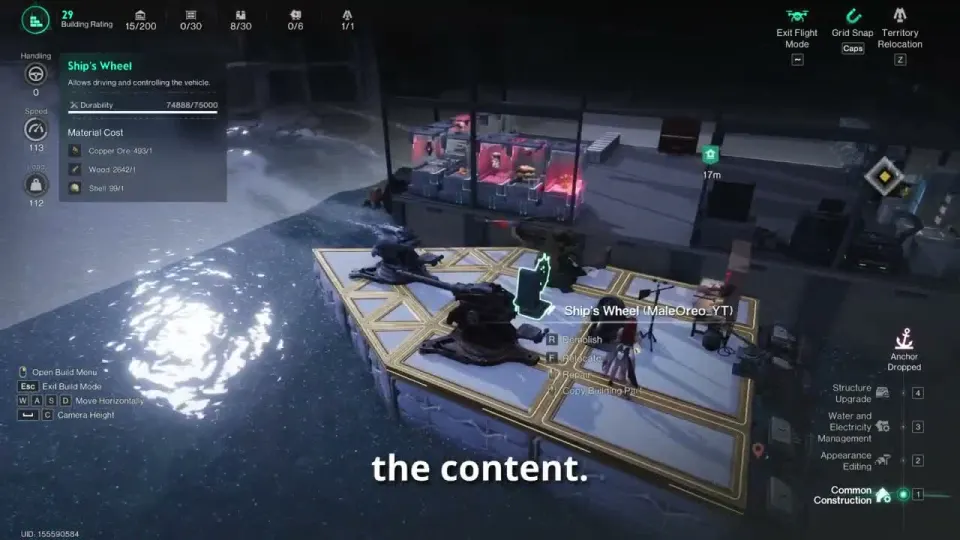 Screenshot: MaleOreo, “ISLES OF ABYSS BOAT GUIDE & TIPS (Max Speed, Remote Ship Storage & Tech Tree)” on YouTube, at 4:52
- Propulsion: his late-game speed setup is 2 thrusters, 4 Advanced Electric Propellers and 2 boosters. Early on, propellers alone already make the boat fast.
- No sails: he drops sails as soon as he can, because sailing into the wind slows the ship. This is a late-game choice; for a first ship, one sail plus a propeller is still a cheap way to move (how-to-build).
- Load: stay inside the first segment of the Load wheel; the further round the circle you go, the slower the boat gets. He calls about 100–500 Load “light” and about 3,000 “medium”, and says a ship around 3,000 still felt slow.
- Armor: a small hull lets you afford alloy and upgraded cannons. Facilities you add on top don’t count toward Load.
- Supplies: with the territory-supplies option on (in the anchor settings), the workbench on board can use materials from your land base. Details on Ship base.
Which cannons to mount: Ship cannons.
3. Workshop trawler (cargo and fishing ship)
A working ship that farms while you sail and lets you craft without going home. Because facilities don’t add Load, this design costs less weight than it looks.
- Propulsion: 3 electric propellers plus one large sail for speed, and 2 side thrusters for handling.
- Production: 2 Trawl Nets and a Tidal Cage. Trawl Nets fill as you sail, and the catch shows up in the ship’s vault. One creator says a ship can hold up to four Trawl Nets.
- Workshop: Supply Bench (cannons and ammo), Furnace, Dismantling Bench and Tech Research table.
- Storage: three storage boxes and a fridge for food.
- Power: generators for the electric gear. Grizl runs eight.
- Weapons: a Harpoon Cannon for sea creatures, a Long Cannon and a Shotgun Turret.
Fish from the nets and the Tidal Cage feed the furnace (mixed fuel) and the synthesis bench (acid), which is why creators fit nets early. Fuel options: Ship fuel. Where hull materials come from: Materials.
src: Grizl o5-Cq9fuLF0 @02:50, @07:00 · OreaChief fQMgsfXiAEw @06:30, @08:30 · MaleOreo d6qDYAK-qkQ @05:13
4. Squad gunline hull
SysFem64’s design is deliberately low and plain, and they expect it to stay useful all the way through the scenario. It suits a crew of friends.
- Bow: a half-hexagon made of triangle pieces: start with one regular triangle and add triangles round it until the point is closed.
- Rams at the front. Mounting them lower may hit smaller, lower ships better.
- Cannons in one straight line, so teammates can shoot over the ship and over each other instead of firing around the deck.
- Straight sides. Don’t let anything stick out sideways; it catches on docks and objects when you come in or leave.
- Open doorways make it faster to get in and out of toxic water.
- Squid defense: the Giant Squid climbs in through gaps in the hull, so close holes or keep a gun covering them. See Fragrant Cape.
Engines here hold a steady speed in any direction, unlike sails, but they burn fuel or power.
5. Warship
DibXP’s warship is about shape and armor: a long iron hull with a tall, angled superstructure.
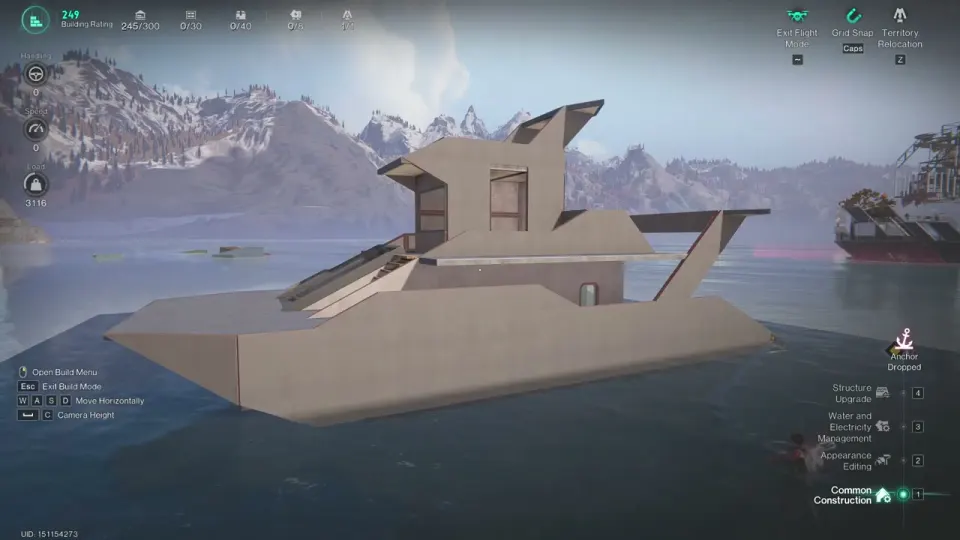 Screenshot: DibXP, “ONCE HUMAN How to build a warship ‘Isles of Abyss’” on YouTube, at 19:14
What you can see in the video:
- Hull: iron hulls and 1/2 iron decks, built up in layers.
- Bow and sides: stacked Iron Triangular Bulwarks give the pointed bow and the sloped, angled armor along the sides.
- Bridge: a multi-level block of iron bulwarks with window frames, with angled roof pieces jutting out.
- Finish: Dark Gray Cement textures applied over the iron in Appearance Editing.
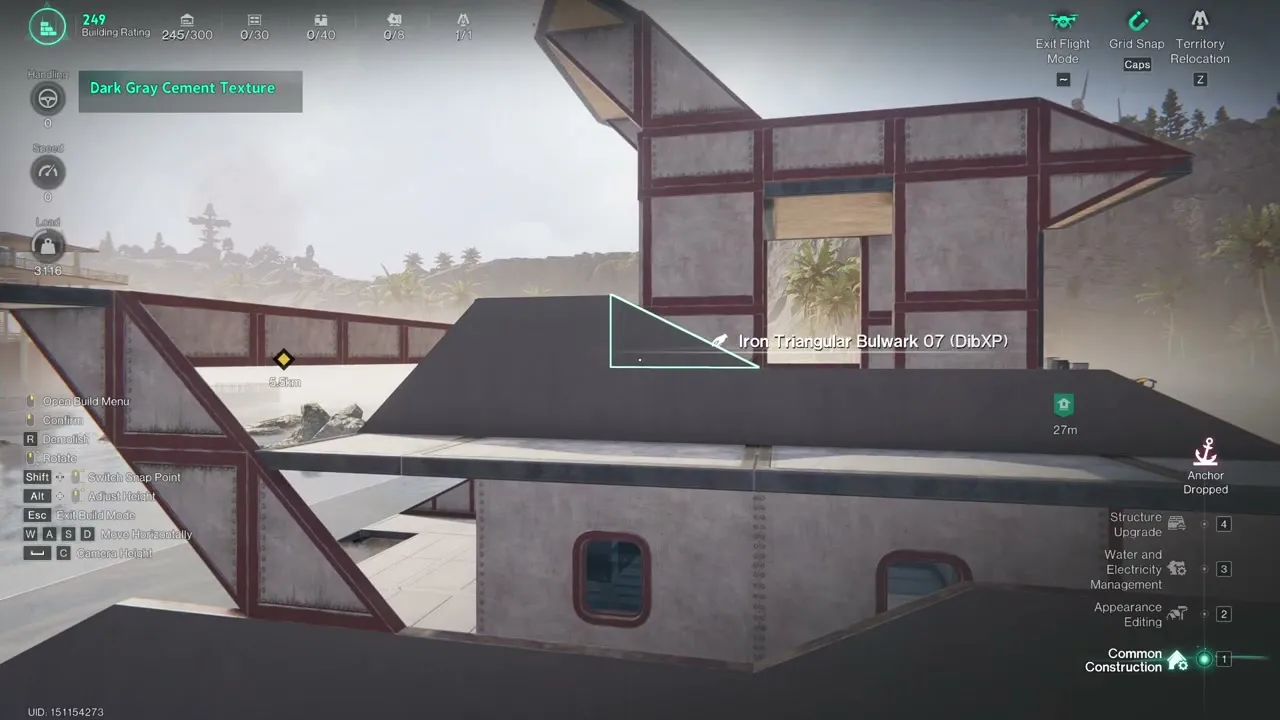 Screenshot: DibXP, “ONCE HUMAN How to build a warship ‘Isles of Abyss’” on YouTube, at 16:16
At this point the HUD already shows a Load of 3,116 before the build is finished, which is in the range MaleOreo calls “medium” and slow.
The frames we have don’t show propulsion or cannons being placed, and the HUD shows a speed of 0 at the end. A hull this tall and heavy will push Load up. If you copy it, use wood for hidden inner walls and keep iron or steel on the outer hull and bow, where cannon fire and Skyfire hit. One creator’s ship built entirely of alloy sank at about 10,000–11,000 Load.
Ship design gallery: transport, warship, houseboat, work boat
Real ships from creators’ videos, grouped by what they’re built to do. Each caption lists only the parts you can see in the shot or that the creator mentions.
Transport: sail raft with a pointed bow
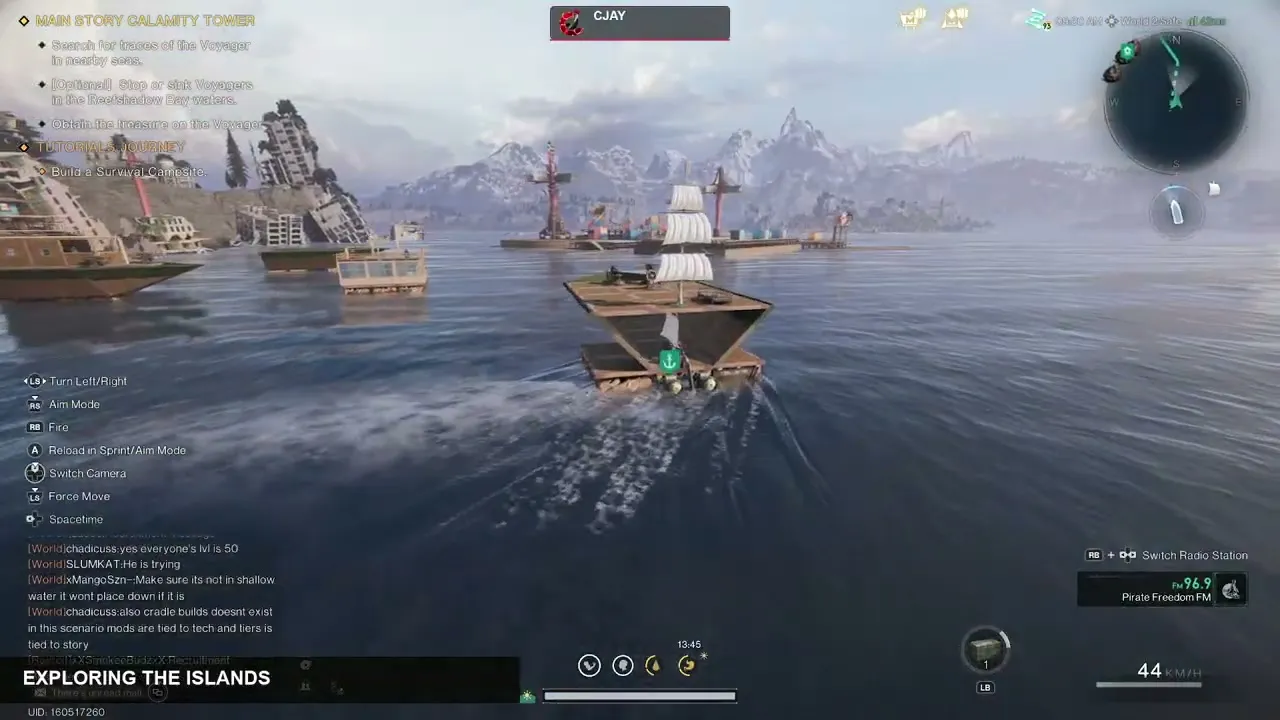 Screenshot: CJay, “How to START SOLO in Once Human Isles of Abyss! RAFT to HOUSEBOAT (Day 1)” on YouTube, at 2:24
CJay’s early island-hopper: a wooden raft with a triangular bow and a mast of large sails, added after he unlocked the Large Sail. It does 44 km/h in this shot. Nothing on it is heavy, so it’s cheap to build and fast enough for getting between islands on day one.
Warship: four-mast gunship
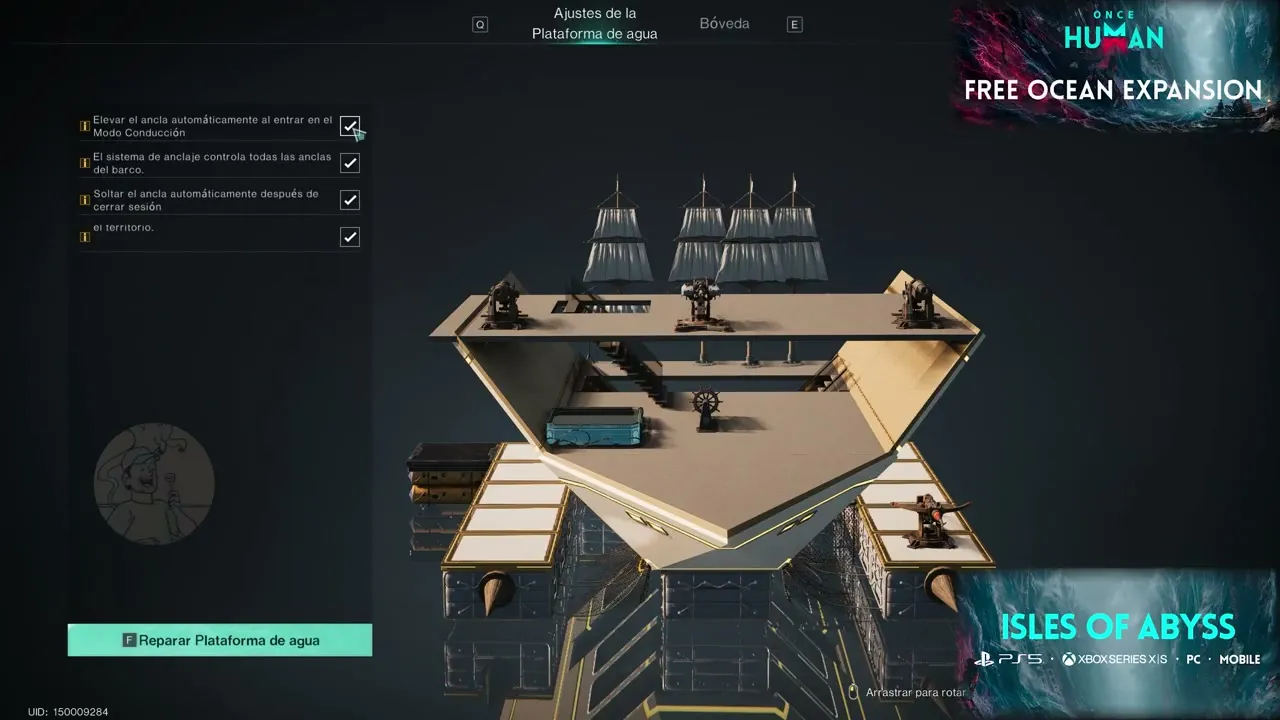 Screenshot: OreaChief, “GUÍA COMPLETA del BARCO en Islas del Abismo | Once Human” on YouTube, at 3:00
OreaChief’s combat ship, seen in the Water Platform settings screen. Three cannons sit in a row on the raised top deck, the helm is on the deck below, and two low pontoons stick out at the sides with cone-shaped spikes at their corners and a fourth cannon. Four masts carry square sails and flags. For a lower, plainer combat hull, compare the squad gunline.
Houseboat: a floating house with cannons
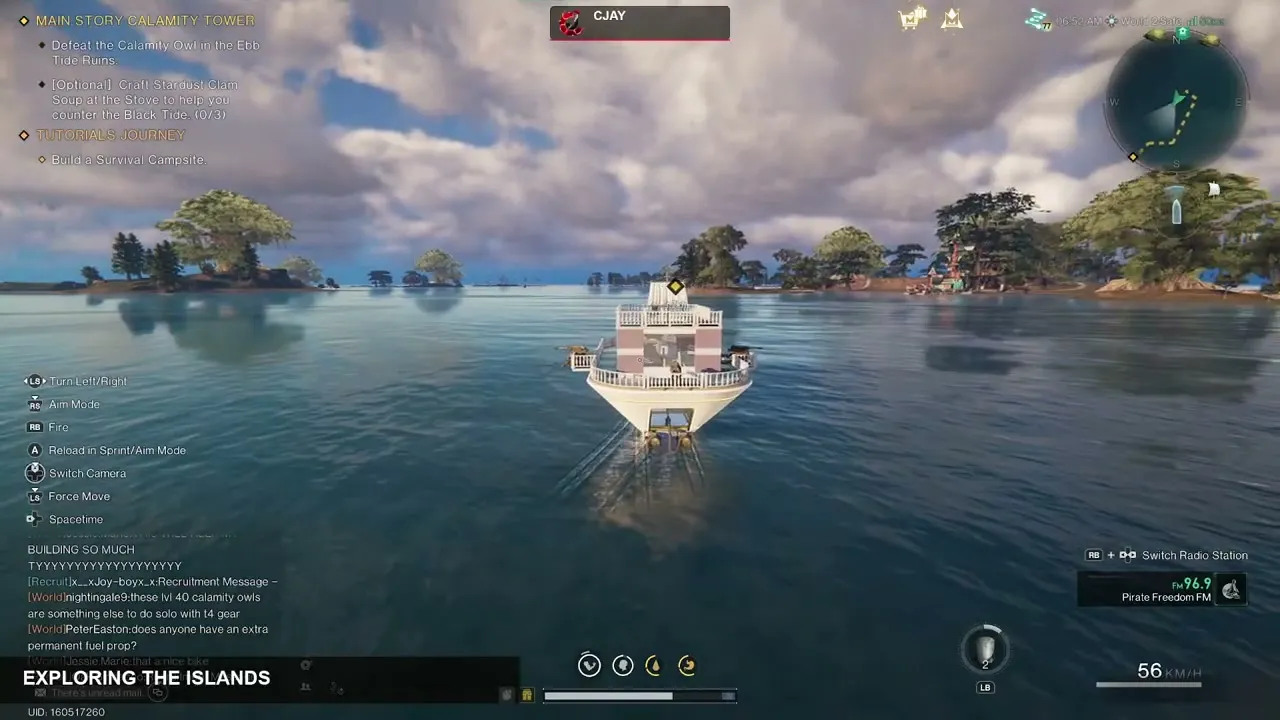 Screenshot: CJay, “How to START SOLO in Once Human Isles of Abyss! RAFT to HOUSEBOAT (Day 1)” on YouTube, at 2:32
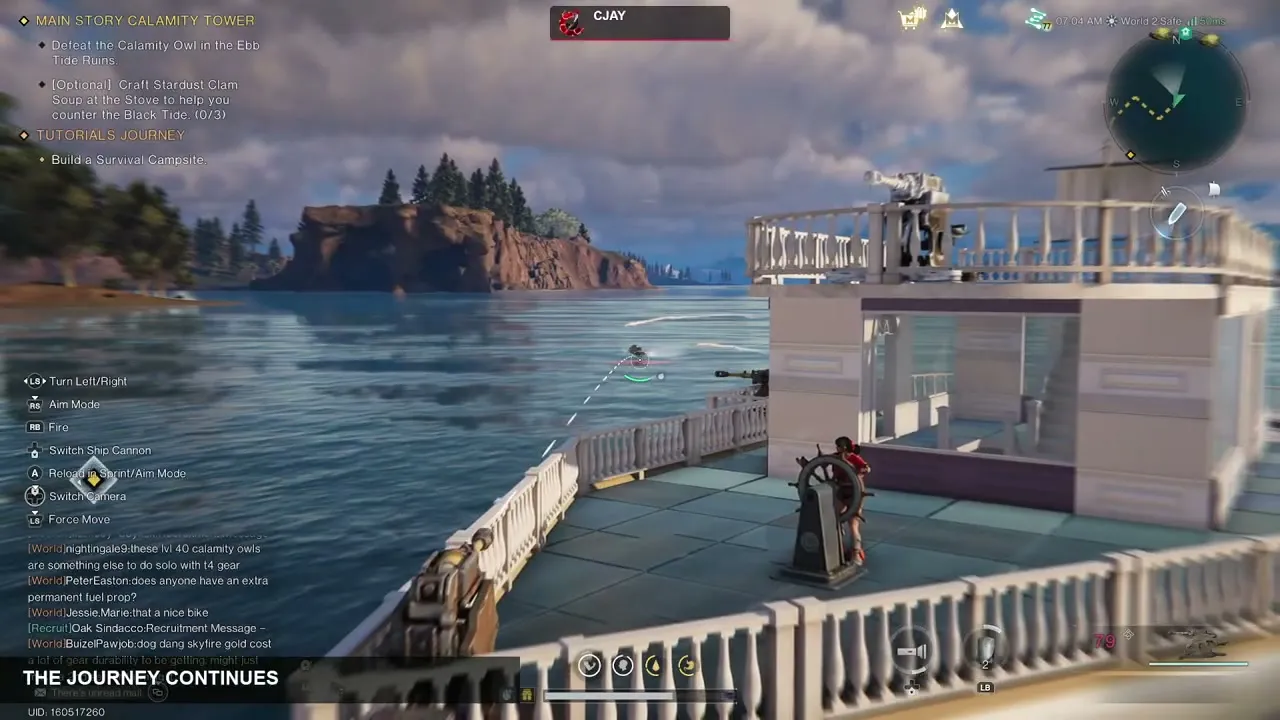 Screenshot: CJay, “How to START SOLO in Once Human Isles of Abyss! RAFT to HOUSEBOAT (Day 1)” on YouTube, at 3:28
The same starting platform later in the day: CJay says it “has become something with actual rooms and deck space”. The helm sits on the open front deck, the cabin has glass walls and a staircase, and cannons are mounted on the upper railing and the side rail, so he fights from the deck between stretches of sailing. It does 56 km/h in the first shot. Living-on-the-ship setup (storage, beds, workbenches): Ship base.
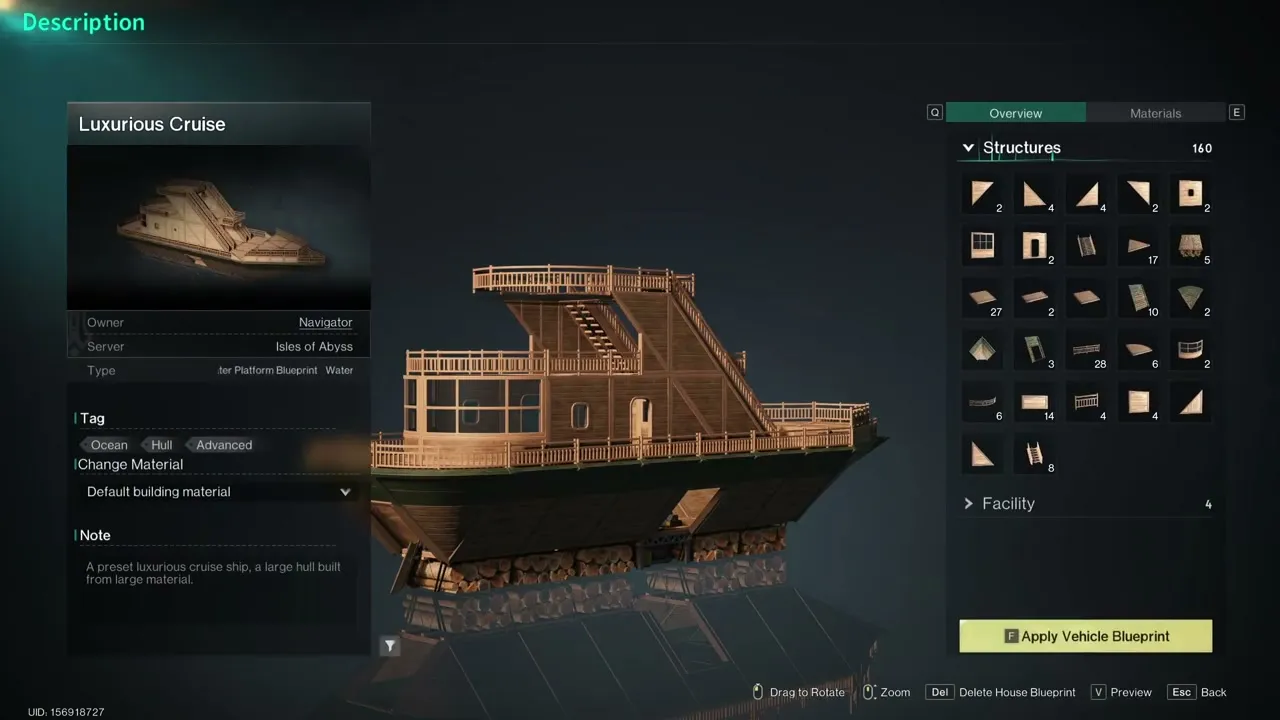 Screenshot: Anestic, “BEST Isles of Abyss Tips & Tricks! 10 Things I Wish I Knew Sooner” on YouTube, at 0:47
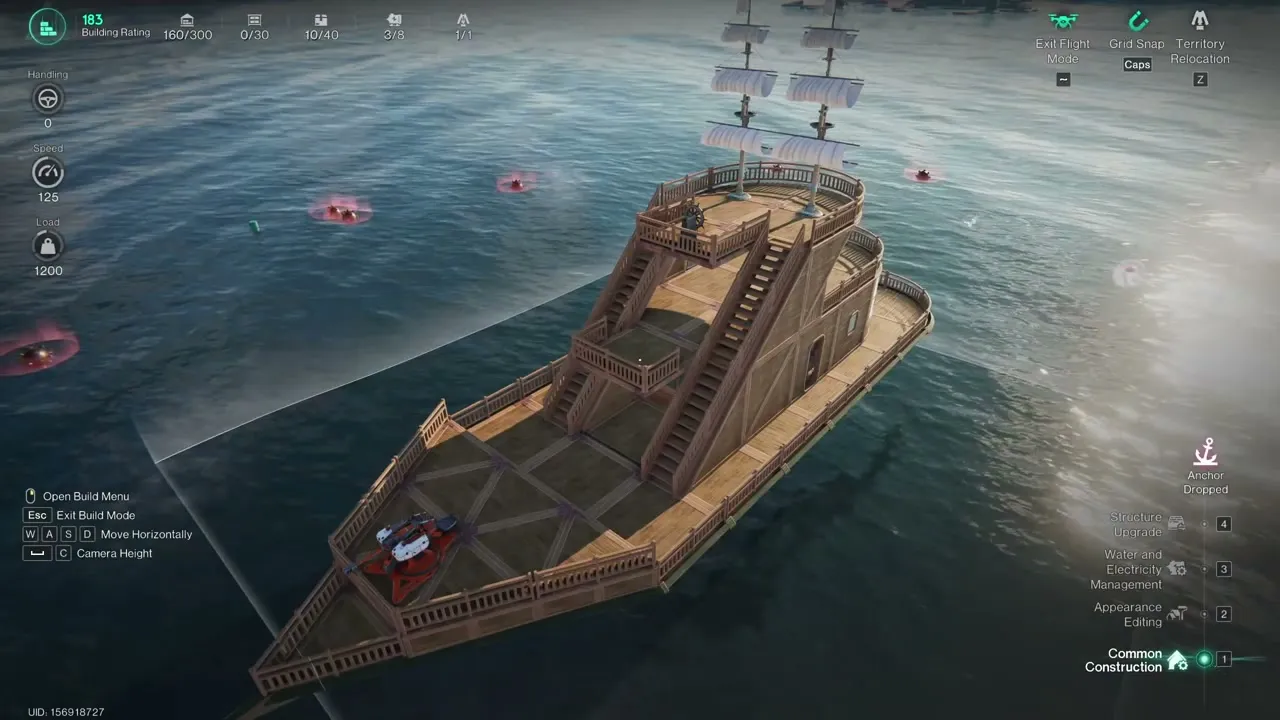 Screenshot: Anestic, “BEST Isles of Abyss Tips & Tricks! 10 Things I Wish I Knew Sooner” on YouTube, at 0:52
If you don’t want to design a house hull yourself, start from a preset. The Luxurious Cruise is a wooden ship blueprint with 160 structures and 4 facilities; its note calls it “a large hull built from large material”. Anestic gathers wood and shells, demolishes everything except the ship core, applies the preset from House Blueprint → Presets, then edits it. His version has two masts of square sails, the helm on the top deck and a cannon on the bow. The Build Mode panel shows Speed 125 and Load 1,200, and he says the changes took about 2 minutes.
Work boat: AFK oil drilling raft
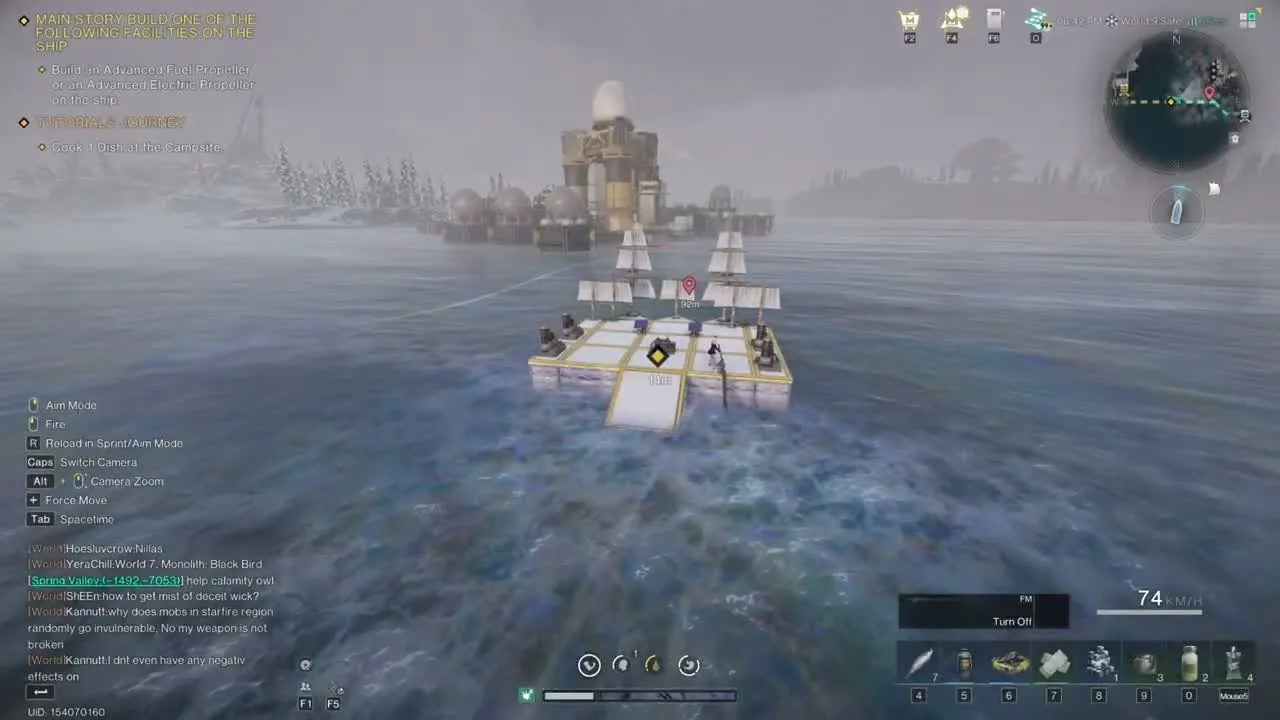 Screenshot: Krithi, “The EASIEST AFK Oil Farm in Isles of the Abyss!” on YouTube, at 0:22
A work boat built only to farm. Krithi says there’s “no fancy equipment, just a few sails and wooden platforms”, which gets it to around 80–90 km/h. On deck, at least two Small Solar Generators power three Drilling Wells. Anchor it at the oil spot and the wells keep pulling crude oil while the boat stays in the area. Spot and setup: Ship fuel.
Save, reuse and share your design (ship blueprints)
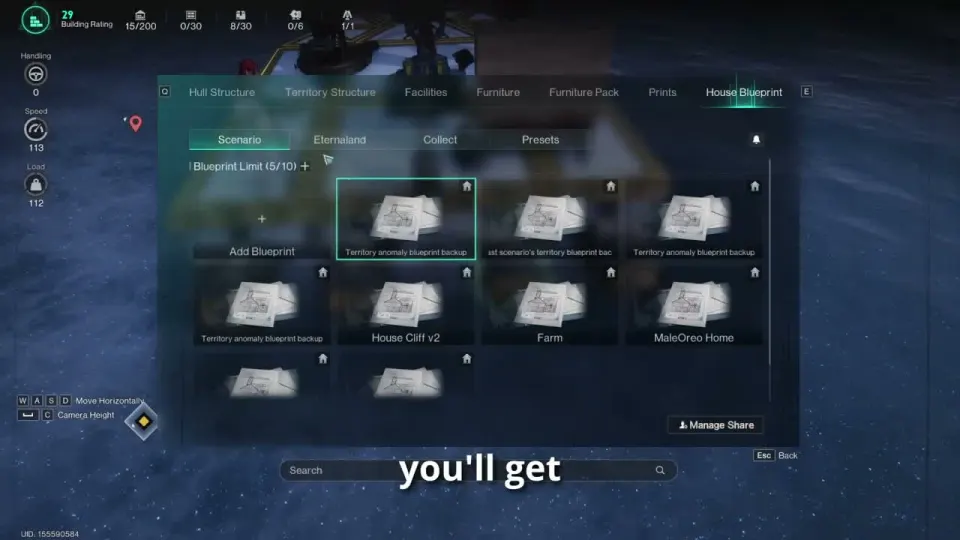 Screenshot: MaleOreo, “ISLES OF ABYSS BOAT GUIDE & TIPS (Max Speed, Remote Ship Storage & Tech Tree)” on YouTube, at 3:20
- Save: select everything connected to the core deck and save it as a ship design. The dev blog describes a separate save entry for ships; the patch notes call the saved file a “Design Layout”. Step-by-step: How to build a ship, step 7.
- Reuse: place a saved ship with Summon Vehicle or Relocation. This is also the quickest fix when a ship is stuck on rocks.
- Share: a Design Layout can be shared with your squad. The build menu also has a Manage Share button.
- RaidZone: save the blueprint at the Anchor. It raises the ship’s total HP and lets you summon it again after it sinks; without a save you get the starting ship back, and cargo aboard is lost.
- Presets: House Blueprint → Presets includes ship hulls marked with an anchor icon: Compact Cruise, Exquisite Cruise and Luxurious Cruise. Apply one to a bare core deck and edit from there (see the houseboat above).
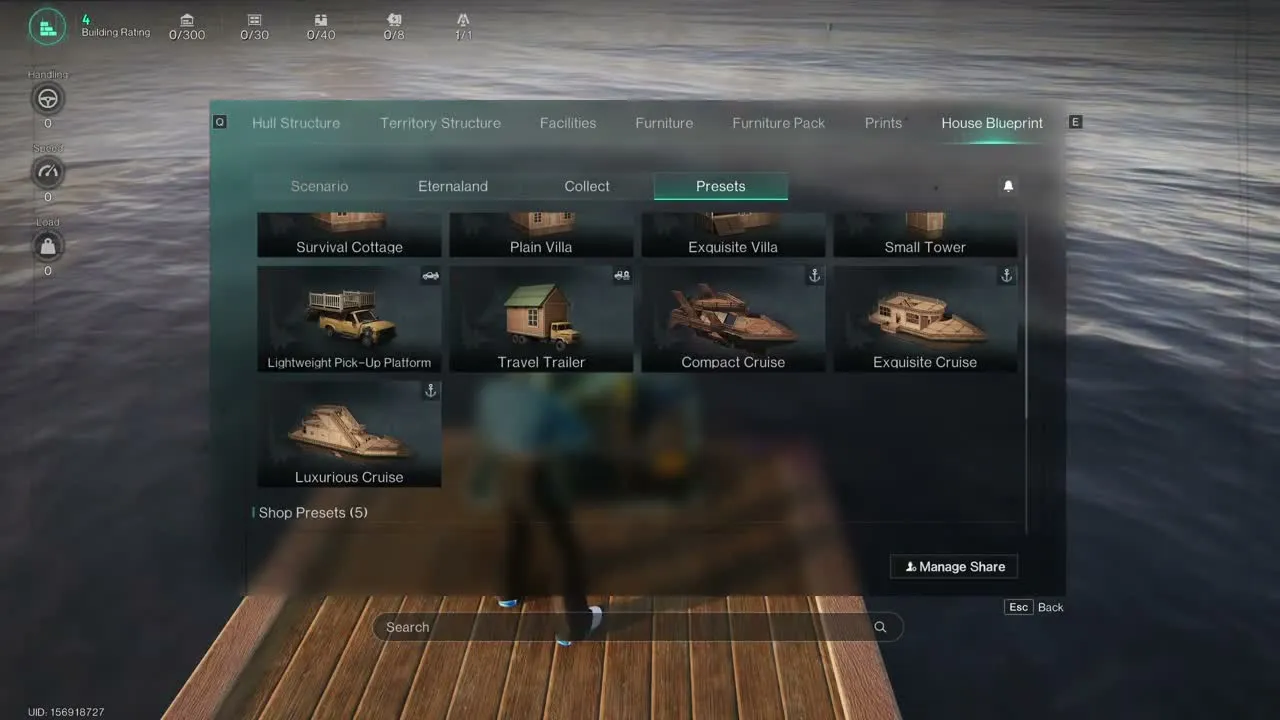 Screenshot: Anestic, “BEST Isles of Abyss Tips & Tricks! 10 Things I Wish I Knew Sooner” on YouTube, at 0:44
- Blueprint tab: the build menu on a ship also shows the House Blueprint tab (Scenario, Eternaland, Collect, Presets) with a blueprint limit counter. The developer hasn’t said yet whether saved ships use this same list and limit.
Other things called “blueprints” in this scenario:
- Drift bottles from beachcombing can contain ship blueprints. What they unlock hasn’t been published yet; we’ll add both once the developer confirms.
- Your existing weapon and gear blueprints carry into Isles of Abyss, but Tech progress limits the quality you can craft. See the beginner guide.
Design rules that apply to every ship
- Plan cannon spots before you fill the deck, and keep the helm easy to reach.
- Test the guns from their real positions on the finished ship; your own walls and facilities can block shots.
- Check the Speed limit in Build Mode before adding more sails or propellers. Extra propulsion can’t push you past the maximum shown there.
- Save a new design every time you change the ship a lot, so a sinking or a bad edit doesn’t cost you the work.
FAQ
What is the best ship design in Once Human?
How do I save my ship as a blueprint?
Do saved ship designs help if my ship sinks?
Can I build a pirate ship?
Can I use my Eternaland skins and prints on a ship?
Do ship designs carry over to another server or scenario?
What changed
- v3.1.1 · 2026-10-25Page created.
- v3.1.1 · 2026-10-26Added a ship design gallery (transport, warship, houseboat, work boat), a warship texture screenshot and the preset blueprint list.
Sources
- Starry Studio (oncehuman.game), New Survival Scenario Isles of Abyss Launches Officially on October 21 (dev blog, 16 Oct 2026): shipbuilding, saving ship designs
- Starry Studio (Steam), Ocean Expansion: Isles of Abyss Is Now Live (patch notes, 21 Oct 2026): Design Layout, Summon Vehicle, RaidZone blueprints
- therealjesstron (YouTube), Once Human Isles of Abyss Boat Template| Can be F2P/Paid Build!
- MaleOreo (YouTube), ISLES OF ABYSS BOAT GUIDE & TIPS (Max Speed, Remote Ship Storage & Tech Tree) - Once Human
- DibXP (YouTube), ONCE HUMAN How to build a warship "Isles of Abyss"
- Grizl (YouTube), Once Human Isles of Abyss: Build a Better Ship & Upgrade Smarter: facilities, propulsion and weapon setup
- MaleOreo (YouTube), ONCE HUMAN ISLES OF THE ABYSS GUIDE! (Ship Building, Haywire Zones & Mechanics): Load and hull materials
- SysFem64 (YouTube), Once Human Boat Guide: hull shape, rams, straight-line layout
- OreaChief (YouTube), GUÍA COMPLETA del BARCO en Islas del Abismo | Once Human: trawling nets, side thrusters, boosters
- Gotcha Beast (YouTube), How to Be Ready Day 1: The Ultimate Isles of Abyss Guide (final test build): cosmetic prints on ships
- CJay (YouTube), How to START SOLO in Once Human Isles of Abyss! RAFT to HOUSEBOAT (Day 1): sail raft and houseboat
- Anestic (YouTube), BEST Isles of Abyss Tips & Tricks! 10 Things I Wish I Knew Sooner: preset ship blueprints
- Krithi (YouTube), The EASIEST AFK Oil Farm in Isles of the Abyss!
Once Human Guide is a fan site. Not affiliated with Starry Studio / NetEase. Once Human and related names are trademarks of their owners.